
Independent resource guide

SolidCraft: from GitHub to your first part

An open-source parametric 3D CAD app built in Rust, for desktop and browser. Find official downloads, learn the sketch-to-solid workflow, and decide where it fits beside Autodesk Fusion.

This is an independent guide, not the SolidCraft project or Autodesk. All software downloads and browser modeling open on their official sites.

Start at the official project

The current repository is tangency-labs/solidcraft. Older bherbruck/solidcraft links may redirect there. Prefer the current repository, solidcraft.io and docs.solidcraft.io over similarly named community sites.

SolidCraft is still evolving. Upstream describes it as early but usable for simple parts. Test your own models and required exports before adopting it for a production workflow.

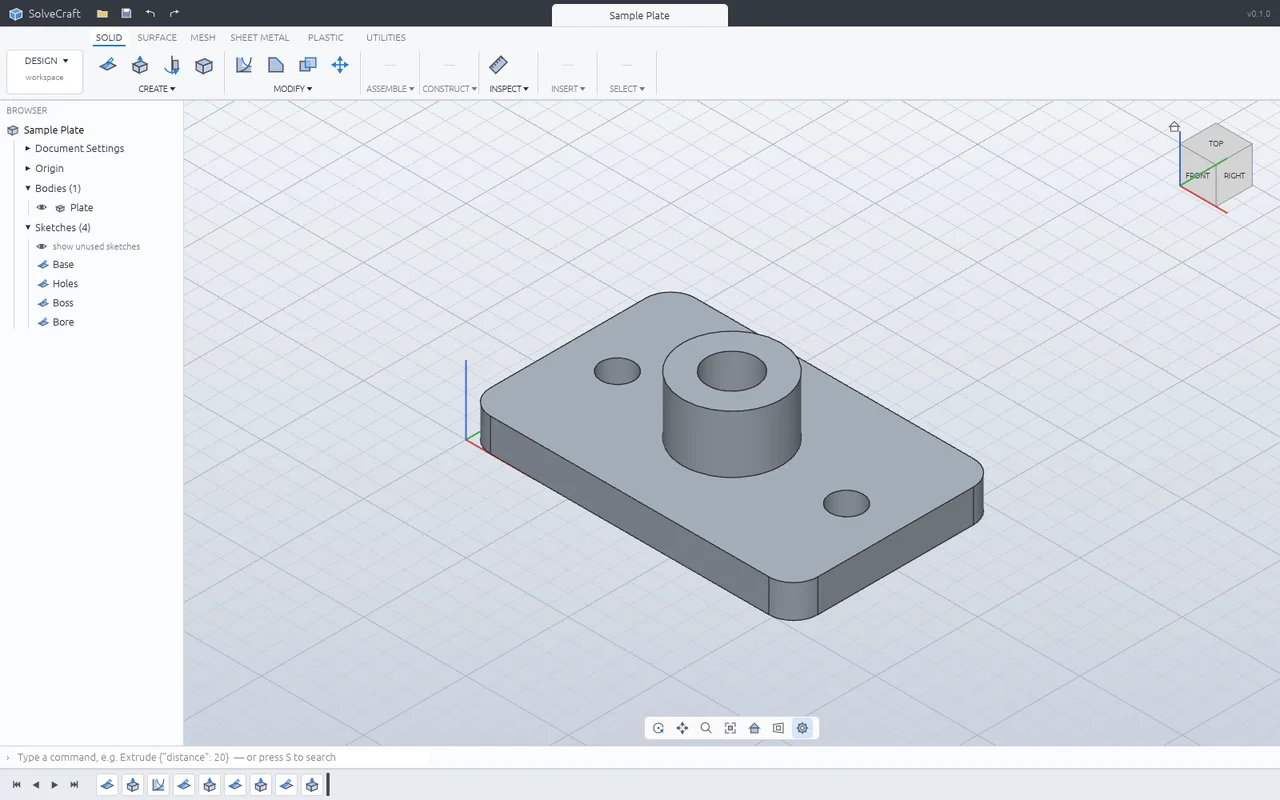
Official SolidCraft interface showing a sample plate, model browser and feature timeline
Official sample plate screenshot, SolidCraft contributors. This is an upstream example, not the block built in the tutorial below. View image source and license

Download and install SolidCraft

Choose your operating system and CPU architecture. These links resolve to assets in the latest official GitHub release; no installer is hosted here. If an asset is unavailable, use the Releases page to find the matching package.

macOS

Download the universal DMG for Apple silicon or Intel Macs. Open it and drag SolidCraft into Applications. If macOS blocks opening, consult the official installation instructions after verifying the package source.

All releases, formats & checksums

First part: a 40 × 30 × 10 mm block

Follow along in the desktop app or official browser app. A desktop browser and mouse are easier for sketch selection. Command labels below use the English interface; use S to search for a command if its toolbar position differs.

  1. 01

    Create a design and check units

    Choose New Design on the Home screen or File → New. Check Document Settings in the Browser and use millimeters (mm) for this exercise.

  2. 02

    Create a sketch on XY

    Choose Create Sketch, then select the XY origin plane (Top). Start a two-point Rectangle with R. Place its first corner at the origin and the opposite corner in the positive X/Y quadrant.

  3. 03

    Dimension the rectangle

    Press Esc to leave the rectangle tool. Use Sketch Dimension (D) on a horizontal edge, enter 40 mm and confirm; repeat on a vertical edge with 30 mm. Keep the origin corner coincident with the origin. Width and height alone do not fix a floating sketch.

  4. 04

    Extrude by 10 mm

    Choose Finish Sketch. Select the filled rectangular profile, then Extrude (E). Enter a one-sided distance of 10 mm, use New Body, and confirm the feature. You now have a 40 × 30 × 10 mm solid.

  5. 05

    Edit a dimension and rebuild

    Double-click the sketch in the timeline to edit it. Change the 40 mm dimension to 50 mm and finish the sketch; the linked extrusion should rebuild to 50 × 30 × 10 mm. Undo to restore the original 40 mm width.

  6. 06

    Save the design, then export a copy

    Use File → Save / Save As to preserve the editable .solidcraft design. Use Export for a downstream STEP solid or an STL mesh for a slicer. An exported file is not a replacement for the original editable timeline.

In the browser, designs use browser-local storage. Export or download a backup using the official file guide before clearing site data or changing browsers. The CAD app opens on its own official origin, not on this site.

SolidCraft vs. Fusion 360: choose for your workflow

Autodesk now calls the product Fusion. This is a practical comparison, not a benchmark or a promise of feature parity. Fusion capabilities depend on the subscription and extensions; personal use has separate eligibility and functionality limits.

AreaSolidCraftAutodesk Fusion
License & cost modelOpen-source under MIT or Apache-2.0. Desktop and browser builds are available without a software subscription.Proprietary commercial subscriptions; a limited personal-use option exists for eligible non-commercial users. Check current terms rather than assuming all use is free.
PlatformsWindows, macOS and Linux desktop packages, plus a browser application.Windows and macOS desktop application with cloud-connected services. Browser access is a separate offering, not the same deployment model as SolidCraft’s public web app.
Parametric modelingConstrained sketches, dimensions and an editable feature timeline. Validate complex geometry against upstream limitations.Parametric CAD in a broader product-development environment. Evaluate the specific tools your project needs.
File exchangeNative .solidcraft designs; STEP and mesh import/export are documented. Supported entities and transfer results need checking.Supports multiple CAD exchange formats; availability depends on the offering. Do not expect SolidCraft’s editable timeline to transfer through STEP.
Manufacturing workflowStart with a simple part and verify exported geometry in your slicer or downstream tool. Check current roadmap before relying on CAM capabilities.Integrates CAD, CAM, CAE and electronics workflows; advanced tools and manufacturing access vary by plan and extension.
Who should try it?Learners, open-source enthusiasts and makers evaluating simple parametric parts. Trial it before replacing an established workflow.Teams or individuals whose required design/manufacturing tools and collaboration needs match a Fusion offering.

SolidCraft questions

Official sources & project status

Checked October 20, 2026. Downloads and features change; follow upstream documentation for the latest details.